

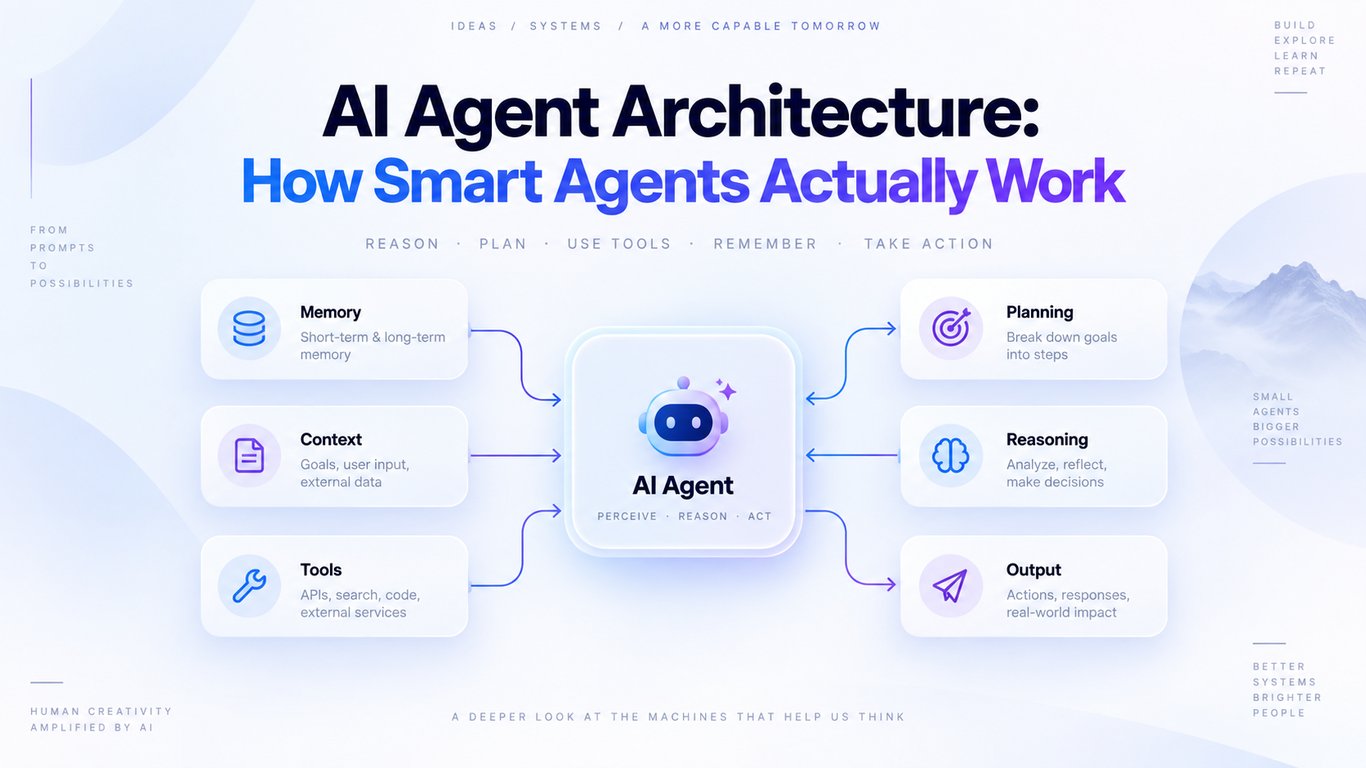
AI Agent Architecture
An AI agent is more than a chatbot with a clever prompt. A chatbot mainly responds to a message. An agent can understand a goal, decide what to do next, use tools, check the result, and continue until the task is complete or human help is needed.
The architecture is the system around the AI model that makes this possible. It connects the model to instructions, tools, data, memory, safety checks, and a reliable runtime. If any of these parts are weak, the agent may sound intelligent but still fail when it has to do real work.
Simple definition: AI agent architecture is the design that lets a model reason about a goal, take controlled actions, learn from the results, and stop safely.
Chatbot, Workflow, and Agent: What Is the Difference?
System
How it works
Best for
Chatbot
Receives a message and returns an answer.
FAQs, writing help, and simple conversations.
Workflow
Follows a fixed sequence written in code.
Stable tasks with clear and predictable steps.
AI agent
Uses a model to choose the next step and tool based on the current situation.
Tasks that involve judgment, changing information, or many possible paths.
This difference matters. If a task can be solved with a normal form, SQL query, or fixed workflow, an agent may add unnecessary cost and uncertainty. Agents are useful when the path cannot be fully decided in advance.
How an AI Agent Works
Most agents follow a simple loop:
-
Understand the goal: Turn the user's request into a clear task.
-
Review the available context: Read relevant instructions, conversation state, and trusted data.
-
Choose the next action: Answer directly, ask a question, or call a tool.
-
Observe the result: Check what the tool returned and whether the action succeeded.
-
Update the state: Save useful progress so the next step has the right context.
-
Stop or continue: Finish when the goal is met, or pause when approval or clarification is required.
User goal -> Agent runtime -> Model + instructions -> Choose an action -> Call a tool -> Observe the result -> Finish, ask the user, or continue
The loop must have clear stop conditions. A production agent should not keep calling tools forever. Common limits include a maximum number of steps, time limit, cost budget, successful final result, or a handoff to a person.
The Core Components of AI Agent Architecture
1. The AI Model
The model is the decision-making engine. It reads the current context, interprets the goal, and chooses what should happen next. A larger model may handle difficult reasoning better, while a smaller model can be faster and cheaper for routing, classification, or simple extraction.
The best model is not automatically the biggest one. Start by measuring task quality, then optimize cost and speed without dropping below the required accuracy.
2. Instructions and Policies
Instructions define the agent's job, boundaries, and behavior. Good instructions are specific: what the agent can do, what it must never do, when it should ask a question, and when it needs human approval.
Policies should come from real business rules, not vague lines such as "be helpful." For example, a support agent needs exact refund limits, identity checks, escalation rules, and approved wording for sensitive situations.
3. Tools
Tools allow an agent to interact with the outside world. A tool can search a knowledge base, read an order, create a ticket, send an email, run code, or update a database record.
Every tool should have a clear name, purpose, input format, and output format. Separate read-only tools from tools that change data. A tool that sends money or deletes a record needs stronger checks than one that reads public information.
-
Data tools retrieve information, such as search, CRM lookup, or document retrieval.
-
Action tools change something, such as updating an order or sending a message.
-
Orchestration tools delegate a focused task to another agent or service.
4. Context and Retrieval
The model can only make a good decision with the right information. The context layer selects the instructions, user data, documents, tool results, and recent messages needed for the current step.
Sending everything on every turn is usually a mistake. It increases cost, slows the agent, and can hide the most important information. Retrieval should bring in only relevant and authorized data.
5. Memory
Memory is useful, but it should have a clear purpose.
-
Working memory stores the current task, recent tool results, and progress.
-
Long-term memory stores approved facts or preferences that may be useful in future sessions.
-
Knowledge sources contain documents and business data that can be retrieved when needed.
Do not treat every past message as permanent truth. Memory can become outdated, incorrect, or unsafe. Store only what is needed, keep user and tenant data separate, and allow important facts to be corrected or deleted.
6. Orchestration and State
Orchestration controls the order of work. It decides which step runs next, how failures are handled, and when the agent should pause or finish. State is the structured record of what has already happened.
For short tasks, this may be a simple loop in application code. Longer tasks often need checkpoints so they can resume after a timeout, server restart, or human approval. State should be structured and easy to inspect instead of being hidden inside one very long prompt.
7. Guardrails, Permissions, and Human Approval
Guardrails reduce risk, but they are not a replacement for normal security. Authentication, authorization, tenant isolation, and access control must be enforced by the application and tool layer, not left to the model.
Useful controls include input validation, output validation, allowed tool lists, least-privilege permissions, spending limits, and approval before high-impact actions. Content returned by websites, emails, documents, or tools should be treated as untrusted data because it may contain misleading instructions or prompt-injection attempts.
8. Observability and Evaluation
You need to know what the agent did, not just what it finally said. Useful logs include model decisions, tool calls, tool results, errors, latency, token usage, approvals, and the reason a run stopped.
Evaluate the complete task. A polished final answer is not enough if the agent used the wrong tool, changed the wrong record, or required too many retries. Track task success, tool accuracy, cost, latency, safety failures, and human escalation rates.
Common AI Agent Architecture Patterns
Single-Agent Tool Loop
One agent receives the goal and uses a set of tools in a loop. This is the best starting point for many products because it is easier to build, test, and understand.
Use it when: one agent can follow the instructions reliably and the tools have clear, different purposes.
Router Pattern
A small routing step identifies the request type and sends it to the right prompt, toolset, model, or specialist. For example, billing questions and technical questions can follow different paths.
Use it when: requests fall into clear categories and each category needs different context or permissions.
Parallel Workers
Several independent tasks run at the same time, and their results are combined. A research agent might search multiple trusted sources in parallel before creating one summary.
Use it when: subtasks do not depend on each other and speed matters.
Supervisor and Specialist Agents
A supervisor breaks a complex goal into smaller tasks and delegates them to specialist agents. The supervisor reviews and combines their work.
Use it when: the task needs clearly different skills, tools, or permission boundaries. Do not add multiple agents only because the design sounds advanced; coordination creates extra cost and more failure points.
Evaluator-Optimizer Pattern
One step creates an output and another checks it against clear criteria. The result is improved only when the evaluation finds a real problem.
Use it when: quality can be judged with specific rules, such as test results, a rubric, or required fields.
A Real Example: Customer Support Refund Agent
Imagine a customer asks, "My order arrived damaged. Can I get a refund?" A reliable agent could follow this path:
-
Identify the request as a damaged-order case.
-
Ask for the order number if it is missing.
-
Use a read-only tool to load the order after the application verifies the customer's identity.
-
Retrieve the current refund policy and check the return window.
-
Ask for required evidence, such as a photo, only if the policy requires it.
-
Prepare the proposed refund and explain the amount to the customer.
-
Request human approval if the value is above the automatic limit.
-
Call the refund tool with an idempotency key so a retry cannot create a second refund.
-
Confirm the result and save an audit record.
Notice that the model does not control everything. Identity verification, refund limits, permissions, and duplicate protection belong in normal application code. The model handles language and judgment inside those boundaries.
Where MCP Fits in the Architecture
The Model Context Protocol (MCP) can provide a standard way for an AI application to connect with external tools and data sources. An MCP server may expose tools, resources, or prompts, while the host application controls the connection and permissions.
MCP is an integration layer, not the agent's brain. It does not decide the goal, planning method, memory policy, or safety rules. Those responsibilities still belong to the agent application and its runtime.
Production Checklist
-
Start with one agent and add complexity only when testing shows a real need.
-
Give every tool a narrow purpose and a strict input and output schema.
-
Enforce user identity, tenant boundaries, and permissions outside the model.
-
Add timeouts, limited retries, and clear error messages for every external call.
-
Make write operations idempotent so retries cannot duplicate actions.
-
Use checkpoints for long-running or approval-based tasks.
-
Set limits for steps, time, tokens, and spending.
-
Require human approval for sensitive, expensive, or irreversible actions.
-
Treat retrieved content and tool output as untrusted data.
-
Log complete traces and run repeatable evaluations before and after changes.
Common Mistakes to Avoid
-
Building a multi-agent system too early: More agents mean more coordination, latency, and debugging.
-
Giving one tool too much power: Split broad tools into focused read and write operations.
-
Using prompts as security: A prompt cannot replace access control or server-side validation.
-
Keeping unlimited memory: Old or poisoned context can lead to bad decisions.
-
Skipping exit conditions: Every run needs a safe and predictable way to stop.
-
Testing only the final response: Inspect the full path, including every tool call and side effect.
Frequently Asked Questions
Are AI agents the same as chatbots?
No. A chatbot mainly produces responses. An agent can control a multi-step task, choose tools, observe results, and adjust its next action.
Does every AI agent need long-term memory?
No. Many useful agents only need the current task state. Add long-term memory only when it improves a real use case and you can manage privacy, accuracy, and deletion.
Should I start with a single agent or multiple agents?
Start with a single agent and clear tools. Move to multiple agents when one agent consistently struggles with complex instructions, overlapping tools, or separate permission domains.
Do I need an agent framework?
Not always. A simple loop with structured tool calls may be enough. A framework becomes useful when you need durable state, complex routing, human approval, tracing, or many coordinated steps.
What is the biggest security rule for AI agents?
Give the agent the minimum tools, data, and permissions required for its job. High-risk actions should use server-side checks and human approval.
Final Takeaway
Good AI agent architecture is not about adding the largest model or the highest number of agents. It is about building a clear loop around the model: useful tools, relevant context, controlled memory, reliable state, strict permissions, visible traces, and a safe way to stop.
Begin with the smallest design that solves the task. Measure it with real examples. Add routing, memory, or multiple agents only when the evidence shows that the simpler design is no longer enough. That approach is easier to operate, easier to secure, and much more likely to work in production.
Further Reading
-
OpenAI: A Practical Guide to Building AI Agents
-
Anthropic: Building Effective Agents
-
Model Context Protocol: Architecture
-
OWASP: Excessive Agency
-
Anthropic: Evaluations for AI Agents
BUILDING AN AI PRODUCT?
Talk to Lofingo about custom autonomous AI agents, enterprise workflow automation, and scalable software systems.
EXPLORE AI SERVICES →