

On this page 17
There is no honest single price for building a SaaS product. A focused B2B MVP, a multi-tenant platform with billing and roles, and an enterprise SaaS with SSO, audit logs, high availability, data residency, and AI features may all be called “SaaS,” but they are completely different engineering projects.
This guide gives you a practical way to estimate SaaS development cost in 2026 without pretending that a number of screens can tell you the real budget. We will break the cost down by product stage, team location, architecture, integrations, security, infrastructure, AI features, and the operational work that appears after launch.
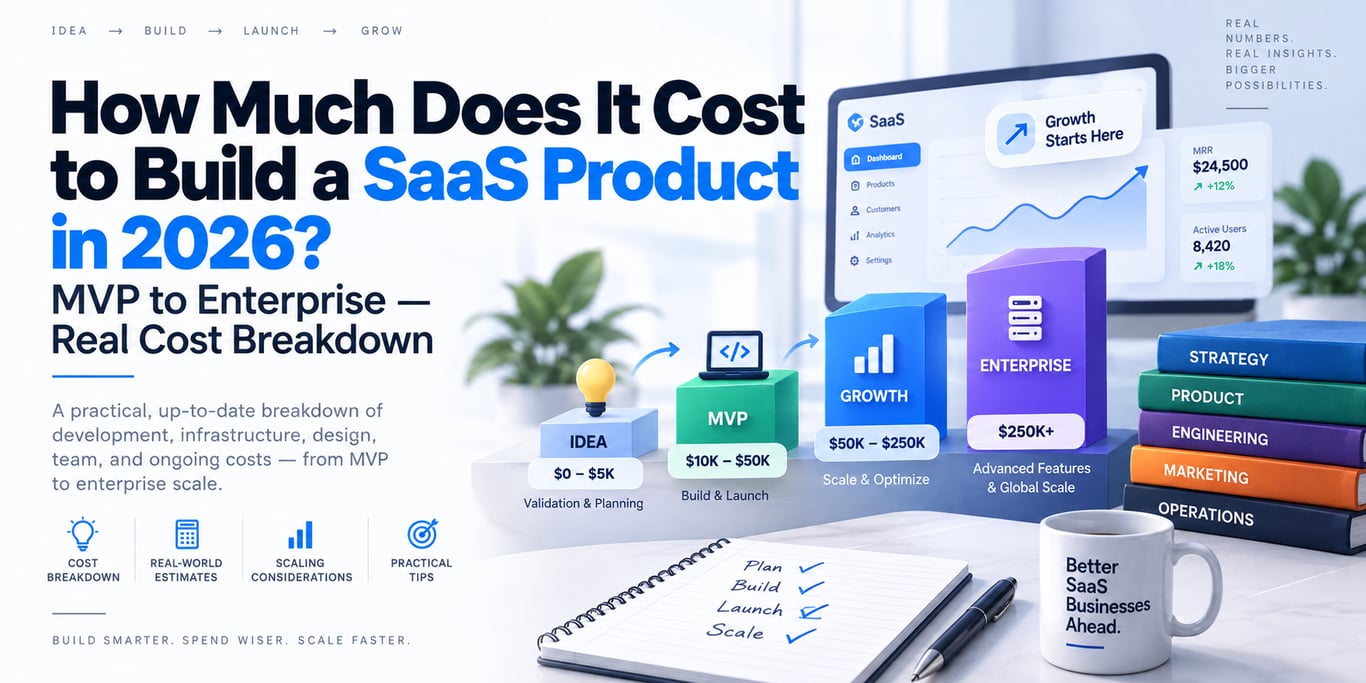
Short answer: a focused production MVP often lands somewhere around $15,000–$60,000; a stronger commercial V1 commonly falls around $40,000–$120,000; growth-stage SaaS platforms can move into $100,000–$300,000+; and enterprise systems can reach $250,000 to $1 million+. These are planning bands, not quotations. Scope, quality bar, compliance, integrations, team rates, and operational requirements matter more than the label “MVP” or “enterprise.”
Why SaaS Development Cost Estimates Are Usually Misleading
Many cost guides start with a list of screens, multiply it by a developer rate, and publish a neat number. That method is attractive because it is simple, but it misses most of the expensive parts of real SaaS engineering.
A production SaaS product is not just frontend pages. It usually includes some combination of:
- authentication and account recovery;
- organizations, workspaces, stores, teams, or tenants;
- roles and permissions;
- billing, subscriptions, trials, invoices, taxes, and plan limits;
- database design and migrations;
- background jobs and queues;
- emails, notifications, webhooks, and scheduled tasks;
- file storage and media processing;
- search, analytics, reporting, or exports;
- third-party integrations;
- logging, monitoring, backups, rate limits, and security controls;
- deployment, rollback, environment management, and incident recovery.
Two products can have the same number of screens and still differ by 5× in engineering effort because their backend, reliability, permissions, data model, integrations, and operational requirements are different.
2026 Development Rate Benchmarks
Team location still changes the economics significantly. Clutch’s September 2026 pricing guide lists average custom software development company rates around $25–$49/hour in India, $50–$99/hour in the United States, and $100–$149/hour in Canada and Australia. Individual firms can sit well above or below those ranges depending on specialization, seniority, delivery model, and reputation.
This is why the same 1,500-hour SaaS build can have dramatically different quoted prices without either quote automatically being wrong.
| Region | Common 2026 agency rate benchmark | 1,000 engineering hours |
|---|---|---|
| India | $25–$49/hour | $25,000–$49,000 |
| United States | $50–$99/hour | $50,000–$99,000 |
| Canada | $100–$149/hour | $100,000–$149,000 |
| Australia | $100–$149/hour | $100,000–$149,000 |
Hourly rate alone is not a quality metric. A senior team that understands product architecture, deployment, database design, and failure handling can sometimes deliver a smaller and safer system than a cheaper team that accumulates rework.
SaaS Cost by Product Stage
The most useful way to think about budget is by the level of product you are actually trying to ship.
| Stage | Typical planning range | What it usually means |
|---|---|---|
| Prototype / proof of concept | $2,000–$15,000 | Validate a workflow, user experience, or technical idea. Usually not production-ready. |
| Focused production MVP | $15,000–$60,000 | One strong core workflow, real auth/data, basic billing or admin controls, deployable production foundation. |
| Commercial V1 | $40,000–$120,000 | Better UX, broader workflows, multi-tenancy, roles, billing lifecycle, notifications, analytics, testing, operations. |
| Growth-stage SaaS | $100,000–$300,000+ | More integrations, automation, scale, reliability, observability, data pipelines, advanced permissions, mobile or realtime features. |
| Enterprise SaaS | $250,000–$1,000,000+ | SSO, SCIM, complex RBAC, auditability, compliance, HA/DR, data controls, enterprise integrations, SLAs, security review, operational maturity. |
These ranges deliberately overlap. Product complexity does not increase in clean steps, and the difference between a $50,000 and $150,000 SaaS is often hidden in requirements such as authorization, data isolation, reliability, integrations, and operational tooling rather than visible UI.
What a Real SaaS MVP Should Include
An MVP should be minimum viable, not minimum quality. If customers will pay for it and trust it with real data, some things are no longer optional.
A sensible SaaS MVP commonly needs:
- a clear primary user journey;
- secure signup/login and password recovery;
- correct authorization on the server, not only hidden buttons in the UI;
- a database schema designed for the current product and obvious near-term growth;
- basic tenant or workspace isolation if the product is multi-tenant;
- subscription or entitlement logic if the business model requires it;
- transactional email and critical notifications;
- backups and a tested restore path for important data;
- centralized error logging and basic health monitoring;
- rate limits and abuse protection where needed;
- a repeatable deployment path and rollback strategy;
- basic automated tests around high-risk business flows.
What an MVP usually does not need is a five-service microservice architecture, Kubernetes, three databases, global active-active deployment, an internal developer platform, or a custom event bus simply because the product might scale someday.
The Biggest Cost Drivers
1. Multi-Tenancy
A true multi-tenant SaaS has to answer more than “which customer owns this row?” You need tenant-aware authorization, unique constraints, billing ownership, background jobs, exports, search, analytics, caching, support tooling, and sometimes tenant-specific configuration.
Simple shared-schema multi-tenancy can be economical. Database-per-tenant or region-specific data isolation increases operational complexity. The right choice depends on compliance, isolation, scale, backup, and support requirements—not on what sounds most enterprise.
2. Roles and Permissions
“Admin and user” is cheap. A matrix of organization roles, branch-level access, custom roles, field-level restrictions, approval flows, delegated administration, and temporary permissions is not.
Permissions touch almost every API and background process. Retrofitting a broken authorization model later is usually more expensive than designing a simple correct one at the start.
3. Billing and Subscription Logic
Adding a checkout button is easy. Building a reliable billing lifecycle can include trials, upgrades, downgrades, proration, failed payments, grace periods, plan limits, coupons, invoices, refunds, taxes, usage-based metering, and webhook reconciliation.
In India, Stripe currently lists standard domestic card pricing at 2% for most India-issued cards and higher rates for foreign or international transactions. Payment processing is an operating cost separate from software development, and pricing should be checked directly with the provider before financial planning.
4. Integrations
Every serious external integration adds more than an API call. Production integrations need authentication, retries, idempotency, timeouts, webhook verification, rate-limit handling, version changes, reconciliation, observability, and support paths when the vendor is unavailable.
Ten “simple integrations” can cost more than an entire core product workflow.
5. Realtime Features
Chat, live dashboards, collaborative editing, live order tracking, presence, typing indicators, and realtime notifications add state synchronization and reconnection problems that normal CRUD applications do not have.
You may need WebSockets or another realtime transport, event fan-out, ordering rules, delivery semantics, offline handling, and multi-instance coordination.
6. Mobile Apps
Adding iOS and Android does not necessarily triple the project cost, especially with a cross-platform framework, but it creates additional UI work, device testing, app-store delivery, push notifications, deep links, background behavior, release management, and platform-specific edge cases.
7. Enterprise Security and Compliance
Enterprise buyers may require SSO, SCIM, audit logs, configurable retention, IP restrictions, security questionnaires, encryption controls, data residency, vendor risk documentation, penetration testing, incident procedures, and contractual SLAs.
These requirements often transform a normal SaaS into a substantially different operational product.
How Much Does SaaS Infrastructure Cost in 2026?
Infrastructure is usually not the main cost of an early SaaS. Engineering time is. A well-designed small product can often run for surprisingly little before traffic becomes meaningful.
Current public pricing illustrates the range:
- Vercel Pro starts at $20/month and includes a $20 usage credit.
- Supabase Pro starts at $25/month, with usage and compute scaling beyond included quotas.
- Cloudflare R2 lists standard object storage at $0.015/GB-month and does not charge internet egress for R2 storage.
- Render reported a July 2026 example of an always-on starter web service plus a small PostgreSQL instance at roughly $13/month before bandwidth and storage growth.
- AWS RDS prices PostgreSQL by instance time, storage, I/O/data transfer where applicable, deployment mode, and region; high availability and larger instances can raise cost quickly.
A lean early-stage SaaS might spend tens or a few hundred dollars per month. A growing product with heavy databases, analytics, media, queues, search, observability, and redundancy can move into thousands or tens of thousands per month. Infrastructure cost follows workload shape far more than user count alone.
Do You Need Microservices?
Usually not on day one.
A modular monolith is often the strongest starting architecture for an early SaaS: one deployable backend, clear internal boundaries, one primary transactional database, and a small number of supporting systems only where justified.
Microservices become useful when you have real independent scaling needs, separate team ownership, deployment isolation, regulatory boundaries, or workloads that genuinely benefit from different runtime characteristics. Starting with microservices before those constraints exist can increase cost through distributed tracing, service-to-service authentication, network failure handling, messaging, deployment coordination, data consistency, and local-development complexity.
Architecture should reduce business risk, not demonstrate how many infrastructure tools the team knows.
PostgreSQL, MySQL, Redis, ClickHouse: What Should a SaaS Pay For?
For many SaaS products, one relational database is enough at the beginning. PostgreSQL and MySQL can comfortably support a large range of transactional workloads when schemas, indexes, queries, and connection management are handled correctly.
Add specialized systems because of a proven workload:
- Redis or another cache: when repeated expensive reads, transient coordination, rate limiting, or queue semantics justify it.
- ClickHouse: when analytical scans, event data, or high-volume dashboards should be separated from transactional workloads.
- Search engine: when database search no longer satisfies ranking, language, filtering, or scale requirements.
- Vector database: when retrieval behavior and scale justify a dedicated vector system rather than because the product contains AI.
Every database you add creates another backup, restore, monitoring, security, migration, failure, and on-call surface. Complexity has a recurring price.
How AI Changes the Cost of a SaaS Product
Adding an LLM API to a product can take hours. Building a reliable AI feature can take weeks or months.
Production AI cost may include:
- model API usage;
- prompt and context design;
- tool/function execution;
- retrieval and embeddings;
- document ingestion and parsing;
- evaluation datasets and regression testing;
- guardrails and permission checks;
- rate/token limits per tenant;
- fallbacks across models or providers;
- streaming and long-running jobs;
- human approval for high-risk actions;
- observability for latency, failures, tool calls, and spend.
The model bill is only one part of AI product cost. The engineering that makes AI behavior controlled, observable, recoverable, and economically bounded is often more important.
What Usually Makes a SaaS Project Expensive?
The expensive pattern is rarely “too much code.” It is uncertainty plus rework.
Common budget killers include:
- building without a defined primary workflow;
- changing the data model late because tenancy was never designed;
- treating authorization as a frontend concern;
- adding microservices before service boundaries are understood;
- building every requested integration before validating demand;
- shipping no observability and debugging production through guesswork;
- using multiple databases without a clear ownership model;
- ignoring failed-payment and subscription state transitions;
- overbuilding internal admin systems before customers exist;
- underinvesting in QA, then paying the cost through regressions.
A Better Formula for Estimating SaaS Development Cost
Instead of asking “How many pages does the app have?”, estimate each major workstream.
- Product definition: requirements, workflows, edge cases, success criteria.
- UX/UI: information architecture, interaction design, responsive states, design system.
- Core application engineering: frontend, backend, APIs, business rules.
- Data: schema, migrations, indexes, reporting, imports/exports.
- Platform capabilities: tenants, roles, billing, files, notifications, jobs.
- Integrations: external APIs, webhooks, reconciliation, failure handling.
- Quality: automated tests, device/browser testing, performance checks.
- Operations: deployment, secrets, backups, monitoring, alerting, rollback.
- Security: threat-sensitive flows, authorization, rate limiting, auditability.
- Contingency: unknowns discovered during implementation.
The final budget is then a function of estimated effort × delivery rate, adjusted for uncertainty and risk. That model is less exciting than a one-line price calculator, but it is much closer to how real software is built.
Example: A Practical B2B SaaS MVP
Imagine a product with:
- company/workspace accounts;
- owner, manager, and staff roles;
- one core business workflow;
- dashboard and reporting;
- Stripe subscription billing;
- transactional email;
- file uploads;
- admin support tools;
- PostgreSQL backend;
- production deployment, backups, and monitoring.
A focused team may be able to ship a strong first version in roughly the $20,000–$60,000 range using 2026 India agency-rate benchmarks, depending on UX depth, integration complexity, quality bar, and whether the scope is actually kept focused. The same scope delivered by a higher-rate market can cost materially more.
Now add native mobile apps, complex custom roles, realtime collaboration, multiple billing models, enterprise SSO, audit trails, ten integrations, advanced analytics, regional data isolation, and AI agents. That is no longer the same project with “a few extra features.” It may move into a completely different budget band.
How to Reduce SaaS Cost Without Building a Cheap Product
Reducing cost should mean removing unnecessary complexity, not removing engineering discipline.
- Start with one painful customer problem. Do not build an ecosystem before proving one workflow.
- Use a modular monolith until independent services are justified.
- Prefer managed infrastructure early. Operating your own database, queue, search cluster, or Kubernetes platform has a staffing cost.
- Design multi-tenancy and authorization early. They are expensive to retrofit.
- Delay speculative features. Build the next feature from evidence, not fear of future competition.
- Reuse proven components. Authentication, billing providers, object storage, email delivery, and observability platforms exist for a reason.
- Instrument the product. Real usage data helps you spend engineering time where it matters.
- Keep architecture proportional to current constraints. “Scalable” does not mean “maximum infrastructure from day one.”
What Should You Budget After Launch?
Launch is not the end of the budget. A SaaS product continues to consume engineering and operational capacity through:
- bug fixes and support;
- security updates and dependency maintenance;
- cloud and third-party services;
- monitoring and incident response;
- backups and recovery testing;
- performance work as usage changes;
- new product features;
- billing, tax, compliance, and platform changes;
- analytics and customer success tooling.
For planning, treat ongoing engineering as a product function rather than a one-time maintenance invoice. A successful SaaS will keep changing because customers, browsers, platforms, regulations, vendors, and workloads keep changing.
Final Takeaway
The useful question is not “What does a SaaS app cost?” The useful question is:
What is the smallest production-grade product that proves the business, protects customer data, can be operated reliably, and leaves us room to evolve?
For many founders, that means resisting both extremes. Do not spend enterprise money before product-market evidence exists, but do not build a disposable prototype and call it production SaaS.
A focused MVP can often be built in the tens of thousands of dollars. A serious commercial platform may require six figures. Enterprise requirements can push the total far beyond that. The correct number comes from scope, architecture, risk, and operating requirements—not from a generic SaaS price calculator.
Planning a SaaS Product?
Lofingo helps teams turn product requirements into practical software architecture and production-ready systems without unnecessary infrastructure or speculative complexity. A good technical plan should tell you what needs to be built now, what can wait, where the real risks are, and how the architecture can evolve as the product earns the need to scale.
Sources and Pricing References
Public pricing and rate examples in this article were checked in September 2026. Vendor pricing changes over time, so always verify current rates before making a financial commitment.
BUILDING AN AI PRODUCT?
Talk to Lofingo about custom autonomous AI agents, enterprise workflow automation, and scalable software systems.
EXPLORE AI SERVICES →